
Home / Inbox warm-up
Inbox warm-up: positive engagement for the campaigns you already send
Add one temporary list to the campaigns you already send. We take care of the engagement and show you the result of each campaign.
No new sending platform. We never send on your behalf.
What is inbox warm-up?
Mailbox providers look at how recipients react to your email. Inbox warm-up adds positive engagement to the campaigns you already send, through a temporary list you include in your recipients, and shows you where each campaign arrived.
Engagement matters
Opens, reads and messages rescued from spam are signals that providers take into account.
Your real campaigns
It works on the messages you actually send, with your content and your platform.
Not IP warmup
IP warmup controls sending volume from a new IP. Inbox warm-up works on engagement instead.
How it works
You keep your sending platform and your schedule. You only add a list to your recipients.
Prepare the campaign
Choose the sending domain and copy your list. It stays valid for 30 days.
Send as usual
Include the list in your campaign, on the platform you already use.
Follow the result
Messages are engaged with gradually, and the campaign appears in your report.
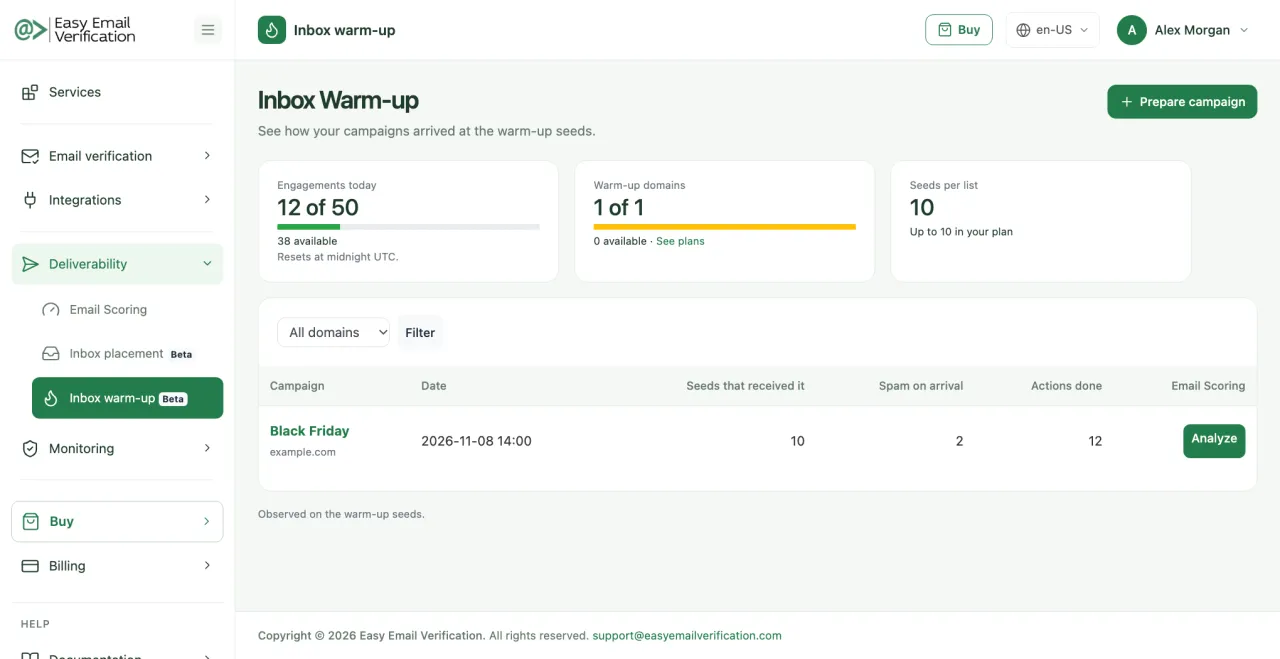
See it in the dashboard
Your daily engagement, your domains and a report for each campaign. Sample data.
Features
Real campaigns, your platform
It works with whatever platform you already use. We never send or reply on your behalf.
Gradual, natural engagement
Interactions are spread out over time and follow a realistic pattern, instead of arriving all at once.
Help getting out of spam
Your campaign also receives positive signals when it lands in the spam folder of the list’s mailboxes.
A report for every campaign
See where each campaign was first observed by provider, how many messages were processed and how authentication went.
Only authenticated mail
Only messages that pass DMARC receive engagement, so your domain’s setup comes first.
Measure what changed
Send a copy to Email Scoring with one click and confirm the results with an Inbox Placement test.
Warm-up, IP warmup and testing: what each one does
These services answer different questions. Many senders use them together.
| Service | What it does | When to use it |
|---|---|---|
| Inbox warm-up | Adds positive engagement to the campaigns you already send. | When your campaigns tend to land in spam or engagement is low. |
| IP warmup | Increases sending volume gradually on a new IP. | When you start sending from a new IP or platform. |
| Inbox Placement Test | Measures where a campaign lands at each provider. | Before important campaigns and to check the effect of changes. |
| Email Scoring | Checks authentication and content of one message. | Before sending, whenever you change the template or DNS. |
Deliverability Tools
Choose the best plan that fits your needs.
Basic
$49 / month
- 50 Email Scoring per month
- 50 Inbox Placement Tests per month
- 10 Blacklist Monitors per month (scanned every 12 hrs)
- 2 DMARC Monitor Domains per month
- 1 Google Postmaster Domain
- 50 Inbox Warm-up interactions per day
Advanced
$99 / month
- 100 Email Scoring per month
- 100 Inbox Placement Tests per month
- 20 Blacklist Monitors per month (scanned every 10 hrs)
- 5 DMARC Monitor Domains per month
- 3 Google Postmaster Domains
- 250 Inbox Warm-up interactions per day
Premium
$249 / month
- 500 Email Scoring per month
- 500 Inbox Placement Tests per month
- 50 Blacklist Monitors per month (scanned every 8 hrs)
- 20 DMARC Monitor Domains per month
- 10 Google Postmaster Domains
- 750 Inbox Warm-up interactions per day
Enterprise
$499 / month
- 1,500 Email Scoring per month
- 1,500 Inbox Placement Tests per month
- 250 Blacklist Monitors per month (scanned every 4 hrs)
- 250 DMARC Monitor Domains per month
- 50 Google Postmaster Domains
- 2,500 Inbox Warm-up interactions per day
Inbox warm-up FAQ
-
Is this the same as IP warmup?
No. IP warmup controls how much you send from a new IP. Inbox warm-up works on the campaigns you already send, by adding positive engagement to them.
-
Does Easy Email Verification send email for me?
No. You keep sending from your own platform. We never send or reply on your behalf.
-
Do I need to change my sending platform?
No. You only add the list to your campaign recipients.
-
Do I need DMARC?
Yes. Only messages that pass DMARC receive engagement. You can set up and follow your domain in our DMARC Monitor.
-
How long is a list valid?
30 days, for every campaign of that domain. You can generate a new list at any time, and then delete the old one from your platform.
-
Does it guarantee the inbox?
No. Mailbox providers decide placement based on many factors. Warm-up helps, and the report and Inbox Placement show how your campaigns are doing.
-
Which plans include it?
All deliverability plans. The number of daily interactions and domains depends on the plan.
Related services
Give your next campaign a better start
Prepare a campaign, add the list and send as usual. Results depend on your reputation, content and list quality. Warm-up complements good sending practices and does not guarantee inbox placement.
Start free trial